Tutorial: a water pump, from model to firmware
This tutorial builds one small system in arche-lang, step by step. The system is a pump controller. An operator panel starts and stops it, and it drives a motor.
On the way you will:
- check the model;
- link a requirement to the part that meets it and to the test that verifies it;
- run that test in the simulator;
- place the controller on a microcontroller;
- generate its Rust firmware;
- run every check in one CI command.
Make an empty folder. Every arche block below goes, in order, into one file
in it, pump.arche. The tutorial's own test compiles exactly these blocks, so
they are the language as it is today. Run the commands from that folder. If
archec is not on your PATH, use node <arche-lang>/dist/cli.js instead.
The reference for every declaration and property is patterns.md. The commands are in commands.md.
1. The project, its data and its messages#
project Pump "Water pump" {
  version "0.1"
}

type Flow = float32 unit l/min range 0..120

message START: bool "Start"
message STOP:  bool "Stop"
message FLOW_RATE "Flow rate" { rate: Flow }

const MAX_FLOW = 100 unit l/min
A message is named in capitals. It carries either one value (here, a truth
value: bool) or fields. FLOW_RATE has one field, rate, of type Flow.
Flow is a number with a unit and a range.
Units are written as they are: l/min, m/s², °C. archec checks that two
values you compare or add have the same quantity.
archec check pump.archepump.arche:1:1 hint No 'system' declared in pump.arche or its includes — nothing will appear on an Arche canvas [no-system]
pump.arche:7:9 hint message 'START' is never used [unused]
pump.arche:8:9 hint message 'STOP' is never used [unused]
pump.arche:9:9 hint message 'FLOW_RATE' is never used [unused]
✓ no errorsThe hints are only advice. They go away as the next steps use the messages and add a system.
2. Components and their ports#
component Controller "Pump controller" {
  satisfies REQ-START
  in cmd:    can "Commands" receives START, STOP
  out motor: can "Motor" sends FLOW_RATE

  var target: float32 = 0 unit l/min

  fn regulate "Flow loop" {
    wcet 200us
    ```arche
    if state == Running {
      send motor FLOW_RATE { rate: target }
    }
    ```
  }
This block does not close the component yet: step 3 adds its state machine.
satisfies REQ-START names the requirement it meets: step 4 writes it.
A port gives three things:
- its direction:
inorout; - its type:
canis a standard port type; - the messages it receives or sends.
A function's body is written in the action language, in a ```arche
block:
state == Runningtests the part's state;send motor FLOW_RATE { … }sends a message on a port;goto Faultwould change the state.
archec checks the body: the names, their types, and what each port sends. Then it translates the body to Python for the Arche simulator, and to Rust or C for the firmware (step 7).
wcet is the worst-case execution time: the longest the function can take.
The timing analysis of step 6 uses it.
A body can also be Python, in a ```python block. Use it for what the
action language cannot say, such as a library call or a list.
3. A state machine#
  states {
    state Idle "Stopped"
    state Running "Pumping"
    state Fault
    Idle -> Running on START [self.target <= MAX_FLOW]
    Running -> Idle on STOP
    * -> Fault on dry_run / log('dry run')
  }
}
The machine starts in its first state, Idle. Read a transition like this:
on START: the transition is taken when the messageSTARTarrives;[…]: the guard, a condition that must hold;/ …: the action, done when the transition is taken;* -> Fault: a transition from every state.
The linter walks the machine. It points out a state that nothing reaches, a
state with no way out, and a trigger that no port receives. Here, dry_run is
such a trigger: archec check gives a hint for it.
The rest of the system:
component Motor "Motor driver" {
  in drive: can "Drive" receives FLOW_RATE
}

component Panel "Operator panel" {
  out buttons: can "Buttons" sends START, STOP
}

system Station "Pumping station" {
  part panel: Panel
  part ctrl:  Controller
  part motor: Motor
  panel.buttons -> ctrl.cmd
  ctrl.motor -> motor.drive
}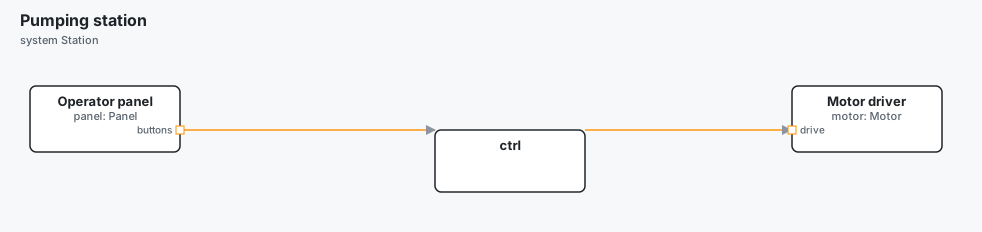
A system is one model in Arche, the graphical editor. Its parts are instances
of the components. a.p -> b.q links two ports. archec checks that the other
end receives what one end sends.
Build the Arche project and open it:
archec build pump.arche -o out
arche --project out
✓ 17 files → out (station.yaml, pumphw.yaml, models.yaml, …)
open with: arche --project …/outout/ is the Arche project: the YAML files that the Arche app reads.
4. A requirement, and who meets it#
requirement REQ-START "Start on command" {
  text "The pump shall start within 100 ms of a START command."
  priority high
  method test
}
archec checks a requirement's text for words that cannot be verified, such as
"as fast as possible" or "TBD". satisfies REQ-START, in the controller (step 2),
says that it meets the requirement: a link to a requirement is written on what
meets it. The test of the next step says that it is verified, with verifies.
5. A test, run in the simulator#
test-plan TP-START "Starting" {
  case TC-START-01 "START starts the pump" {
    verifies REQ-START
    at 0ms do ctrl.target = 50.0
    at 10ms do send panel.buttons START(true)
    within 100ms expect ctrl.state == Running
  }
}
A case is a timeline. at a moment, do something. within a delay, expect
something. The lines are written as the controller's bodies are: send a
message from a part's port, set a part's variable, compare its state with
one of its states.
archec test builds the project, then runs its test plans in the Arche
simulator (arche-cli):
archec test pump.arche -o out --coveragePASS TP-START/TC-START-01 START starts the pump
1/1 passed, 0 failing, 0 known failure(s)
Requirements: 1 verified by passing cases, 0 failing
Coverage (station.yaml):
states 2/3 67 %
not covered: ctrl: Fault
transitions 1/4 25 %
not covered: ctrl: Running -> Idle
not covered: ctrl: Idle -> Fault
not covered: ctrl: Running -> Fault
messages 2/3 67 %
not covered: STOP: panel.buttons -> ctrl.cmd
functions 1/1 100 %
requirements 1/1 100 %It says which cases pass and which requirements they verify. With --coverage,
it also says how much of the state machines, messages and functions the tests
went through, and what they missed.
6. Where it runs#
component Mcu "Pump MCU" {
  kind processor
  cores 1
  hal stm32
  chip "stm32f446re"
  inout can0: can "CAN"
}

system PumpHw "Pump hardware" {
  part mcu: Mcu
  component bus "CAN bus" {
    kind bus
    bitrate 500kbps
  }
  mcu.can0 -> bus
}

deployment Onboard "On the pump" {
  system Station
  platform PumpHw
  binary pump_fw "pump.elf" on mcu {
    thread ctl "Control" { runs ctrl; period 10ms; step regulate; priority 10 }
  }
}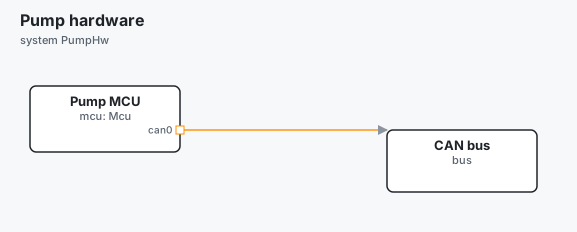
The platform is a system too. Its parts are processors and buses. A
deployment places the logical system on the platform, without changing
either. Here the controller runs on a thread of the MCU. Every 10 ms, the
thread calls regulate.
archec analyze pump.archeDeployment Onboard
Threads
thread where prio C T D R
ctl mcu/cpu0 10 200us 10ms 10ms 200us ok
Cores
mcu/cpu0 2 % (RM bound 100 %) ctlIt gives each thread's response time (R) against its deadline (D), and each
core's load. Here the thread needs 200 µs every 10 ms, so the core is 2 % busy.
7. The firmware#
archec gen pump.arche --target embassy -o generated generated/embassy/pump_fw/src/arche.rs
generated/embassy/pump_fw/src/app.rs
generated/embassy/pump_fw/src/main.rs
generated/embassy/pump_fw/Cargo.toml
generated/embassy/pump_fw/.cargo/config.tomlIt writes one Rust crate per binary, for the Embassy
async runtime. Here there is one binary, so one crate: generated/embassy/pump_fw/.
src/arche.rsis written again at each run. It holds:- the messages and their CAN codec;
- one channel per link;
- the state machine of part
ctrl:CtrlState,CtrlEvent,CtrlMachine::next; - its behaviour trait,
CtrlBehaviour; - the task of thread
ctl. When a START arrives, the task fires the machine before it calls the part.
Names come from the part, not from its component. Two parts of one component are two structs.
src/app.rsis written once; after that it is yours to edit. It holds:- the part's struct,
Ctrl, withtargetat its initial value, and its machine; - the guard to implement,
guard_target_le_max_flow; - each function.
regulateis already Rust, translated from its```archebody. A Python body would be left in a comment, for you to port.
- the part's struct,
src/main.rs,Cargo.tomland.cargo/config.tomlare set up for the STM32F446RE chip.
Build it with Rust's tools:
cd generated/embassy/pump_fw && cargo build --release8. In CI#
archec ci pump.arche -o out --coverage-min 50 --junit report.xmlruns, in one command, what a pipeline checks: lint, format, timing, TARA (the security analysis), build, the tests and their coverage. It prints the test results, then one line per gate:
archec ci pump.arche
  ✓ lint      0 error(s), 0 warning(s)
  ✓ format    1 file(s) formatted
  ✓ vet       2 style finding(s) (--strict fails on them)
  – ui        no ui
  ✓ timing    1 deployment(s) hold
  – conform   no `source` names a file of the code (--src <dir>)
  – tara      no threats
  – verify    no requirement with a formal property
  ✓ build     17 file(s) → out
  ✓ test      1 case(s) pass
  ✓ coverage  58.3% (7/12) ≥ 50%
✓ ci: every gate passed
  JUnit report: report.xml
A – is a gate with nothing to check. report.xml is the JUnit report for the
CI server. The command exits with 1 when a gate fails.
9. Sharing components: libraries#
A component that several projects use goes in a library. A library is a folder
with a library.arche file. That file names the library and gives its version.
library pump-parts "Pump parts" {
  version "1.2.0"
}
Versions sit side by side, as shared/pump-parts@1.2.0/ and
shared/pump-parts@2.0.0/. A project says three things: where the libraries
are, which versions it accepts, and which file of the library it includes:
project Pump "Water pump" {
  libraries "../shared"
  uses pump-parts "^1.2"
}

include "pump-parts/motor.arche"
^1.2 means 1.2 or newer, but before 2.0. archec takes the newest version
there is, unless the file arche.lock says otherwise:
archec lib pump.arche          # each library, the version used, the others there are
archec lib pump.arche lock     # arche.lock: the versions and a fingerprint of their files
Once locked, the version is kept until you lock again. If a library's files change but its version does not, archec points it out.
Where next#
- patterns.md — every declaration, with its properties and an example.
- commands.md — every command.
- The examples:
examples/physics(equations, 30 lines),examples/autonomous-car(a full stack: requirements, deployment, test plans, code generation).