Concepts: the model before the syntax
arche-lang describes a system with five ideas. Each one is small. Learn these five, and the rest of the language is detail.
Each section below has a picture and a model that compiles. The test
test/teach.test.js checks every one. To try a model, save it as room.arche
and check it:
archec check room.arche✓ no errorsThe one-page syntax is in the cheat sheet. The full language is in the specification and the language reference.
1. Definition and instance: component and part#
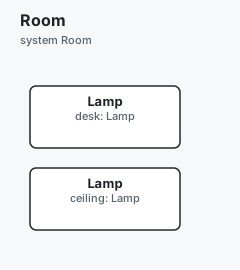
A component is a definition: a kind of thing, written once. A part is an
instance of it, placed in a system. Two parts of one component are two
things, each with its own state and variables.
flowchart LR
  Lamp["component Lamp<br/>(the definition)"]
  subgraph Room["system Room"]
    desk["part desk: Lamp"]
    ceiling["part ceiling: Lamp"]
  end
  Lamp -. instance of .-> desk
  Lamp -. instance of .-> ceiling
component Lamp "Lamp" {
var level: uint8 = 0
}
system Room "Room" {
part desk: Lamp
part ceiling: Lamp
}
A system is what Arche (the graphical editor) shows on its canvas. It is also what the simulator runs. A system is a definition too, so a part can be a system. This is how a model nests.
2. Port, message, link#
A part talks to another part through its ports. A port has three things:
- a direction:
in,outorinout; - a type, which is the medium:
can,ethernet,gpio…; - the messages it sends or receives.
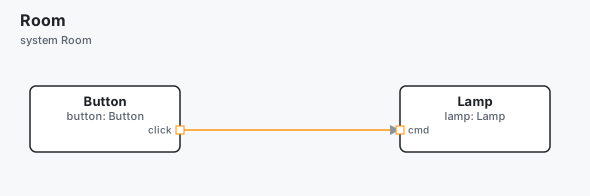
A message is the data that travels. A link a.p -> b.q joins two ports of
two parts. archec checks that the other end receives what one end sends.
flowchart LR
  button["button: Button"] -- "click → cmd<br/>PRESS { count }" --> lamp["lamp: Lamp"]
message PRESS "Press" { count: uint8 }
component Button "Button" {
out click: can sends PRESS
}
component Lamp "Lamp" {
in cmd: can receives PRESS
}
system Room "Room" {
part button: Button
part lamp: Lamp
button.click -> lamp.cmd
}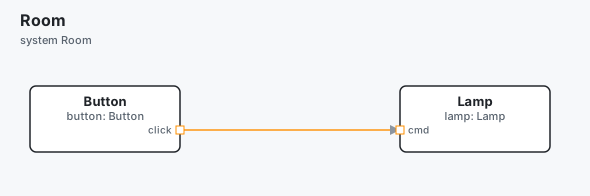
The ports belong to the component. The link belongs to the system. So the same
Lamp can be wired one way in one system, and another way in another.
3. State machines and triggers#
A component can have one state machine. It starts in its first state. A
transition A -> B on TRIGGER [guard] is taken when the trigger comes and the
guard holds. A trigger is a message that arrives on a port, or a named event.
A guard is a condition in brackets; it is optional.
A function's body can also change the state, with goto. It can test the
state, with state == On.
stateDiagram-v2
  [*] --> Off
  Off --> On: PRESS
  On --> Off: PRESS
  On --> Off: main, after 10 s (goto Off)
message PRESS "Press" { count: uint8 }
component Button "Button" {
out click: can sends PRESS
}
component Lamp "Lamp" {
in cmd: can receives PRESS
states {
state Off
state On
Off -> On on PRESS
On -> Off on PRESS
}
fn main "Night mode" ```arche
wait 10s
if state == On {
goto Off
}
```
}
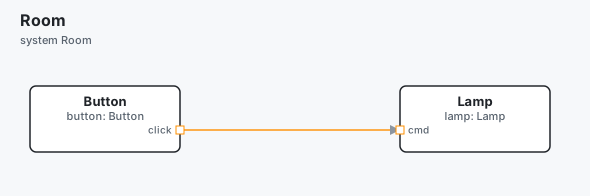
system Room "Room" {
part button: Button
part lamp: Lamp
button.click -> lamp.cmd
}
The body is written in the action language, in a ```arche block.
archec checks the names, types, states and ports the body uses. It translates
the body to Python for the simulator, and to C, Rust and Go. The function
main is special: it runs from the start, as the part's own thread.
4. Requirement, satisfies, verifies, test plan#
A requirement says what must hold. Two words link it to the rest, each
written on the other end of the link:
- a component
satisfiesit: that is where the requirement is met; - a case of a test plan
verifiesit: that test shows it holds.
(satisfied-by and verified-by, written on the requirement, are the old
forms: read until 0.13, and archec fmt moves them.)
archec reports a requirement that nothing satisfies or nothing verifies.
flowchart LR
  req["requirement REQ-ON"]
  lamp["component Lamp"] -- satisfies --> req
  tp["test-plan TP-ON<br/>case TC-ON-01"] -- verifies --> req
message PRESS "Press" { count: uint8 }
requirement REQ-ON "Turn on" {
text "The lamp shall turn on within 50 ms of a press."
}
component Button "Button" {
out click: can sends PRESS
}
component Lamp "Lamp" {
satisfies REQ-ON
in cmd: can receives PRESS
states {
state Off
state On
Off -> On on PRESS
On -> Off on PRESS
}
}
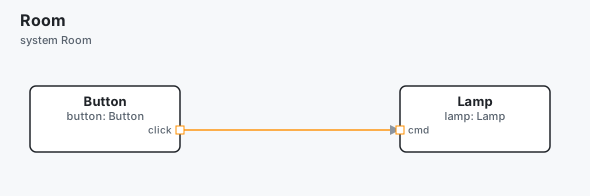
system Room "Room" {
part button: Button
part lamp: Lamp
button.click -> lamp.cmd
}
test-plan TP-ON "Turning on" {
case TC-ON-01 "A press turns it on" {
verifies REQ-ON
at 0ms do send(button.click, PRESS(count=1))
within 50ms expect lamp.state == "On"
}
}
archec test runs the case in the simulator. A test step is Python, as the
simulator runs it. do acts, and expect checks. The command first writes the
project the simulator runs (arche-out/), then runs the cases:
archec test room.arche✓ 12 files → arche-out (room.yaml, models.yaml, templates.yaml, …)
open with: arche --project …/arche-out
PASS TP-ON/TC-ON-01 A press turns it on
1/1 passed, 0 failing, 0 known failure(s)
Requirements: 1 verified by passing cases, 0 failing5. System, deployment, generated code#
The logical system says what the parts do. A second system, the platform,
says what they run on: processors and buses. A deployment places each part of
the first system on the second. It names a binary on a processor, and a thread
in that binary that runs the part. Neither system changes.
The generators read the deployment and write the code, one program per binary.
flowchart LR
  logical["system Room<br/>(what it does)"] --> dep["deployment Board"]
  hw["system RoomHw<br/>(what it runs on)"] --> dep
  dep --> gen["archec gen --target c<br/>embassy · go · ros2 …"]
  gen --> code["lamp_fw: C, Rust, Go…"]
message PRESS "Press" { count: uint8 }
component Button "Button" {
out click: can sends PRESS
}
component Lamp "Lamp" {
in cmd: can receives PRESS
var level: uint8 = 0
fn dim "Dim" {
```arche
if level > 0 {
level -= 1
}
```
wcet 50us
}
}
system Room "Room" {
part button: Button
part lamp: Lamp
button.click -> lamp.cmd
}
component Mcu "Lamp MCU" {
kind processor
cores 1
inout can0: can "CAN"
}
system RoomHw "Room hardware" {
part mcu: Mcu
}
deployment Board "On the board" {
system Room
platform RoomHw
binary lamp_fw "lamp.elf" on mcu {
thread ctl "Control" { runs lamp; period 10ms; step dim }
}
}
archec gen room.arche --target c -o generatedThis writes generated/c/:
lamp.c, the part. Itsdimis translated from the```archebody:if (self->level > 0) { self->level -= 1; }.arche_types.handarche_types.c, the types of the messages.lamp_fw/, the program of the binary: itsmain.c, the thread that callsdimevery 10 ms, and a Makefile.
See code generation for every target.
Where next#
- The cheat sheet: the core declarations, one line each.
- The tutorial: a water pump, from model to firmware.
- Starting a project:
archec new, a project that checks clean.