The browser simulator
The browser simulator lets you see your model work before you install anything else. It runs a model's behaviour on a virtual clock, in plain JavaScript. That behaviour is the state machines, the ```arche bodies, the messages on the links, and the periodic threads of a deployment.
A first run#
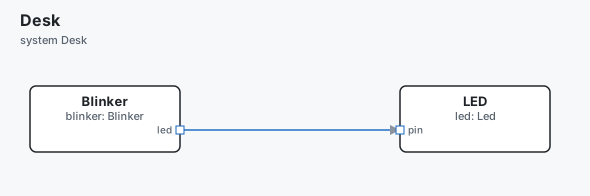
Save this model as main.arche. A blinker switches between two states every
500 ms and sends the LED a message each time.
message BLINK { on: bool }

component Blinker "Blinker" {
  out led:    data sends BLINK
  var blinks: int32 = 0
  states {
    state Off {
      on-enter ```arche
        send led BLINK { on: false }
      ```
    }
    state On {
      on-enter ```arche
        blinks += 1
        send led BLINK { on: true }
      ```
    }
    Off -> On on "after 500ms"
    On -> Off on "after 500ms"
  }
}

component Led "LED" {
  in pin: data receives BLINK {
    handler BLINK -> show
  }
  var lit: bool = false
  fn show(on: bool) ```arche
    lit = on
  ```
}

system Desk {
  part blinker: Blinker
  part led:     Led
  blinker.led -> led.pin
}
Run it for one second:
$ archec sim main.arche --for 1s
Desk — system Desk, 1.000 s simulated
    0.000 ms  blinker: Off
    0.000 ms  blinker.led → led.pin  BLINK {"on":false}
  500.000 ms  blinker: Off → On
  500.000 ms  blinker.led → led.pin  BLINK {"on":true}
     1.000 s  blinker: On → Off
     1.000 s  blinker.led → led.pin  BLINK {"on":false}

3 message(s), 3 state change(s)
at 1.000 s: blinker Off
Each line is one event: its time, then what happened. The same model gives the same trace every time.
To watch it in a browser instead, write a page and open it:
$ archec sim main.arche --html sim.html
✓ sim.html — Desk: 2 part(s), opens in any browser, nothing to install
Open sim.html and press Play.
Where it runs#
The simulator runs in four places. All four use the same code.
| Where | How |
|---|---|
| A terminal | archec sim main.arche prints the trace |
| Any browser | archec sim main.arche --html sim.html writes one page that runs it: open it, press Play |
| VS Code | the ▶ Run button of the diagram panel, or Arche: Simulate in Diagram (arche.sim.run), or ▶ Simulate above a system |
| The Arche Store | a package whose model does something has a Try it link: it runs in the visitor's browser |
Arche has its own simulator (archec test, archec run). It is the reference.
It runs the model's Python and charges each body its wcet (its worst-case
execution time). It models the CPUs, the buses and faults, and it checks test
plans. The browser simulator is the quick look. There is nothing to install, and
you see every step.
The trace as data#
--json gives the same trace as data. Each event has its time t in
nanoseconds and its kind:
kind |
What it is | Its fields |
|---|---|---|
send |
a message sent | from and to as part.port, msg, payload, arrive |
state |
a state change | part, from, to |
ignored |
a message the part had nothing to do with in its current state | |
drop |
a message sent on a port linked to nothing | |
log |
a log line | |
note |
something that is not simulated (once) | |
error |
a division by zero, or a loop that never waits |
To ask why something happened in a run, or why it never did, see why.md. Its commands run the simulator in a mode that keeps more: what caused each event, the transition each state change took, the values each guard read and each change of a variable. A plain run keeps none of these, so its trace stays as above.
What it simulates#
- Parts and links. It runs every part of the system. That is the active
deployment's system, or else the first system that does something.
--systemnames another one. A message sent on a port reaches every port linked to it. It goes through composites and delegated ports (port out = mcu.i2c). It arrives after the links'latency. - One thing at a time per part. A part can be busy, for example in a
wait. A message that arrives then waits its turn, as in Arche. - State machines. A machine starts in its initial state, and that state's
on-enterruns at time 0. A message fires the first transition whose guard holds. That transition may start from the current state, from a state around it, or from*. Thenon-exitruns, then the action, then the machine enters the new state and runs itson-enter.- A composite state enters its initial child.
- A
pseudo choicetakes its first transition whose guard holds. on "after 500ms"fires when the state has lasted that long.- A guard may read the fields of the message that triggered it:
Answered -> Waiting on PING [n > 2].
- Bodies in the action language. All of the action language is translated to
JavaScript.
waitsuspends the body.gotomoves the machine. An integer divided by an integer is an integer. - Bodies in Python. Python that says only what the action language can say
is translated to JavaScript:
self.x = …,await wait(ms(2)),send(self.p, M(k=v)),await goto("S"). It is the same translationarchec genuses, and it runs in the browser too. Lists of a fixed size, comprehensions overrange,sum/min/max,a if c else b,//and%are translated too (spec.md). - Python the action language cannot say runs as real Python: a list that grows, a dict, a big int, a library call, an exception, a class. See Python bodies below.
- Bodies in TypeScript. All of TypeScript runs, as Arche runs it
(handlers.md). Its types are removed.
selfis the part andmsgis the message that triggered the body. Arche's API is there:await wait(ms(2)),send(self.p, M({ k: v })),reply(…),await goto("S"),await self.f(x), and the seededrand(). In a TypeScript component, a guard may be TypeScript too:[msg.force > 0 && !self.open]. - What starts things.
fn mainruns from time 0, as a thread of its own.- A deployment's thread with a
periodand astepcalls that function once each period. The first call is at one period. - A port's
on-receiveand its handlers run when a message arrives. A handler is writtenhandler MSG -> fn. Its parameters are taken from the message's fields by name, or else in order.
- Sensors and actuators.
- A sensor's out port adds its
noiseto what it sends. Then it saturates the value to the field'srangeand rounds it to itsresolution. - An actuator's in port clamps its command to the field's
range. Its output follows the command through itsgain,lagandforce-range. The trace shows adriveline at each command, and the page shows a plot. - A port's
latencyadds to the latency of its links. - The noise is drawn from a seed:
--seed, elsesimulation { seed }, else 1. So each run is the same, and the page's Reset and time scrubber replay the same draws (spec).
- A sensor's out port adds its
- The store's devices. A device with no code of its own does what its
interface does: a BME280 reads a temperature drifting about 21 °C with its
noise, a servo turns at its speed, a relay closes and says so in the trace.
part.op(…)over a link to a device runs it (see Sensors by what they do). The world around a device is a variable of the part:air.temperature,door.pressed. - Keyframes. A keyframe is a saved starting point of the system.
--keyframe raisedstarts from the keyframeraised: its parts' variables and its actuators' commands. The position and velocity of a joint, a ball or a free body belong to the plant.
What it does not simulate#
The simulator says so rather than guess. Each item below is listed under "not
simulated" in the terminal, in the page and in VS Code. It is also a note in
the trace when it would have run.
- Python bodies, where no Python is there to run them: in VS Code's ▶ Run, and in a page that could not load Pyodide. The function does nothing and returns its type's zero, and the trace says so once.
- TypeScript that calls what only Arche's simulator runs:
recv,select,call, locks, bits, streams, timers,wait_until,clock. The body stops with an error that says so.Math.randomandDatestop it too, because a run must replay the same way. - A trigger that is neither a message nor
"after …", such ason boot_doneoron "self test passed". Nothing in the simulation fires it. In Arche, a test step or another part'sgotowould. - Execution time (
wcet), CPUs and their scheduling, buses and their bitrate, faults, plants and FMUs, memory and signals. Arche's simulator does those. A test plan runs here only with--test: itsat,within,neverandalways, not its faults.
How close it is to Arche's simulator#
- On
examples/live, the two simulators give the same messages with the same payloads, and the same state changes in the same order. Only the times differ, by the execution times Arche charges. test/websim.test.js checks this when arche-cli is beside the checkout. - A model can have its behaviour in TypeScript or in Python: examples/ts-handlers,
and each template with its ```arche bodies written out in each language. Each
version gives the same trace in
archec sim, the same verdicts against its MuJoCo plant, and the same verdicts in Arche's simulator. test/tsreach.test.js runs them all. - A timed transition such as
Braking -> Released on "after 25ms"is taken by both simulators, whatever the handler language. It is written to the Arche project astrigger: after 25ms. It fires after the delay spent in its state. The delay restarts when the state is entered again, and is cancelled when the state is left.
Python bodies#
A body in Python that the action language cannot say runs in a real Python.
archec simstarts onepython3for the run. Each call is synchronous: the simulator waits for its answer, as it waits for an ```arche body. The values go to Python and back as JSON.- The page (
--html) and the store's Try it load Pyodide 0.29.3 from cdn.jsdelivr.net, only when the model has such bodies. Pyodide also loads the packages the code imports, when it has them (numpy, sympy, scipy, pandas…). If it cannot load, the page says which functions need the terminal.
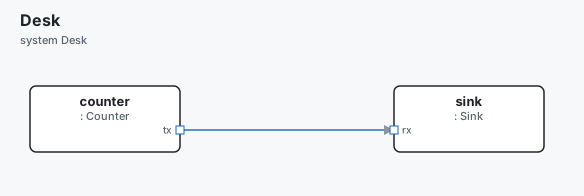
This model keeps a list on a part and sends its sum:
project "Squares" {
  handlers python
}

message TICK { n: int32 }

component Counter {
  out tx: data sends TICK
  var n:  int32 = 0
  fn main ```python
    while self.n < 3:
        await wait(ms(10))
        self.n += 1
        send(self.tx, TICK(n=self.n))
  ```
}

component Sink {
  in rx: data receives TICK {
    handler TICK -> got
  }
  var items: any = []
  fn got(n: int32) ```python
    self.items.append(n * n)
    print("sum", sum(self.items), "big", 2 ** 70 + n)
  ```
}

system Desk {
  part counter: Counter
  part sink:    Sink
  counter.tx -> sink.rx
}
$ archec sim main.arche --for 40ms
Squares — system Desk, 40.000 ms simulated
Run in Python (the action language can't say them):
  sink.got (line 24: ** other than ** 2 and ** 0.5)
   10.000 ms  counter.tx → sink.rx  TICK {"n":1}
   10.000 ms  sink: sum 1 big 1180591620717411303425
   20.000 ms  counter.tx → sink.rx  TICK {"n":2}
   20.000 ms  sink: sum 5 big 1180591620717411303426
   30.000 ms  counter.tx → sink.rx  TICK {"n":3}
   30.000 ms  sink: sum 14 big 1180591620717411303427
What a Python body can do:
- Everything Python does.
selfis the part: its variables, its ports (self.tx), its functions (await self.fib(10)), itsstate. - Arche's API:
await wait(…),await goto("S"),send(port, MSG(f=v)),log(…),now(),rand(),ms(…)and the rest offrom arche import *.printis a log line.reply(…)does nothing: no caller waits for it here. - A
code "x.py"file is loaded as a module. Its imports, helpers and classes are there, and a def runs as itself. A def with noselfis a plain function:def gcd(a, b)binds tofn gcd(a: int64, b: int64). - A guard or a transition's action in Python runs the same way, in a component written in Python.
Each run is the same:
random(and numpy's, when the code imports it) is seeded from the run's seed (--seed, elsesimulation { seed }, else 1).- The clock is the simulated one:
time.time(),time.monotonic(),time.perf_counter()anddatetime.now()read the simulated time, from 1970-01-01.time.sleep()does nothing.input()fails.
When it goes wrong:
- An exception is an
errorline in the trace, with the body's line:ZeroDivisionError: division by zero (b.f, line 6). - Each call has a timeout: 5 s, or
--py-timeout 10s. Past it,python3is stopped and the call fails. The next call starts a newpython3, without what the old one held. - A missing module says the pip command that installs it.
What the action language cannot say#
archec sim lists those bodies once, before the trace: each function, hook,
guard or state, with its line and what in it the action language can't say.
counter.main above is not in the list: its Python translates.
With no Python to run them, they are not simulated: each returns its type's
default (0, false, an empty list), and the trace goes on. That is so with
--no-python, and when there is no python3 (said once, at the start):
$ archec sim main.arche --for 40ms --no-python
Squares — system Desk, 40.000 ms simulated
Not simulated (Python the action language can't say):
  sink.got (line 24: ** other than ** 2 and ** 0.5)
   10.000 ms  counter.tx → sink.rx  TICK {"n":1}
   20.000 ms  counter.tx → sink.rx  TICK {"n":2}
   30.000 ms  counter.tx → sink.rx  TICK {"n":3}
A test case never passes on such a default. On the browser simulator
(archec test --sim web, archec sim --test), a case whose run reaches a
body no Python ran is inconclusive, and the run exits 1:
INCONCLUSIVE TP-MED/TC-MED-01 The median of three
        inconclusive: `ctrl.got` is Python the action language can't say, and no Python ran it (install python3, or say which with --python; or archec test without --sim web, in Arche)

1/2 passed on the browser simulator, 0 failing, 1 inconclusive, 0 known failure(s)
An inconclusive case verifies none of its requirements, and fails none
(.archec/test-results.json says inconclusive). With python3 there, the
same case runs its Python and passes or fails on what it computes.
The --json trace has the list as gaps (where, why, line, and file
for a .py file), python (whether they ran), and a note event with gap
where a body that did not run was reached.
archec check says it too, as a hint (not-simulated) on each such body, in a
project that simulates (a simulation block or a test plan). The editor's ▶ Run
has no Python: there, they are not simulated.
The values#
| Python | In the simulator | Its type in the model |
|---|---|---|
int up to 2^53 |
a number | int32, int64… |
a bigger int |
{"$int": "1180591620717411303425"}, exact |
any |
float, nan, inf |
a number, {"$float": "nan"} |
float64 |
str, bool, None |
a string, a boolean, null |
string, bool |
list, tuple |
an array (a tuple comes back as a list) | T[] or any |
dict with string keys |
an object | a struct, or any |
another dict, a set, bytes, complex |
{"$dict": [[k, v], …]}, {"$set": […]}, {"$bytes": "hex"}, {"$complex": [re, im]} |
any |
| anything else: an object, a generator | a handle, {"$ref": 3, "repr": "Node[1, 2]"} |
any |
A handle stays in Python. When it comes back to Python, it is the same object.
So a var tree: any can hold a Python tree from one call to the next.
Python and its packages#
archec sim runs, in order:
--python <path>, orARCHE_PYTHON(--no-python: none);.venv/bin/pythonin the model's folder (or a folder above it);python3, or a newerpython3.Non the PATH when the model asks for one (pip "python>=3.14").
A component says what its Python needs with pip: pip "numpy>=1.26", "sympy".
A function, the project or a library can say it too. archec sim checks it and
prints the command for what is missing. It installs nothing:
note: the Python bodies need sympy>=1.12, which /usr/bin/python3 does not have. Install it:
  /usr/bin/python3 -m pip install 'sympy>=1.12'
  or in a venv beside the model, which archec sim then uses: /usr/bin/python3 -m venv .venv && .venv/bin/pip install 'sympy>=1.12'
An older Python also runs code written for 3.14: except A, B: is read as
except (A, B):, and annotations are read late, as 3.14 reads them.
Doctests#
archec sim main.arche --doctest runs the doctests of every .py file the
model names (code "x.py"), in the same Python as the simulation: seeded, on
the simulated clock, with a timeout per file (30 s, or --py-timeout).
--json gives each file's functions with their examples and failures.
$ archec sim main.arche --doctest
  - counter.py: no doctest
  ✓ maths.py (2 function(s), 3 example(s))

2 of 2 file(s) pass, 3 of 3 example(s)
Simulation only#
A component whose Python cannot run on a microcontroller says
simulation-only (a function can say it too). It runs in archec sim, in
Arche's simulator and in a host process. The checker warns when a deployment
puts it on a microcontroller (simulation-only). archec gen --target c,
cpp, embassy and go then write nothing:
note: --target c refuses deployment OnMcu: 'maths' runs on thread t, on mcu (os freertos), but it is `simulation-only`: its Python runs only in simulation and on a host. Run it in a process on a processor with `os linux`, or in the simulator (`archec sim`); or leave it out of this deploymentOn a processor with os linux, linux-rt or qnx (or a container runtime),
it is kept.
Against a plant#
A plant is a simulation of the physical world the model controls.
archec sim main.arche --plant mujoco/plant_bridge.py runs the model against a
plant that runs in another process. That can be the MuJoCo plant that
archec gen --target mujoco writes (see MuJoCo). It can
also be any command that speaks the same JSON lines.
The model and the plant run in lockstep, one period at a time. The plant sets the period. Each period:
- The plant's sensor messages come in, as if their parts sent them along their
links. The trace shows each one as an
input. - The model runs one period.
- The messages the model sent to the plant's actuators go back. Each one is applied from its arrival time.
The plant reads and acts as the model says: noise, latency, the control
range, lag and so on. MuJoCo and the bridge do this, from the same seed. The
plant starts from --keyframe when one is given.
Test plans with no plant#
archec sim main.arche --test runs the test plans' cases on the simulator
alone, in periods of 10 ms, with the same at, within, never and
always as below. Python the action language can't say runs in python3, one
for the run, started afresh for each case; a case that reaches it with no Python
is inconclusive (above). It is how a scenario presses a button or warms the air
around a sensor of the store:
test-plan TP "The greenhouse" {
  case TC-WARM "The air warms: the fan runs" {
    at 2s do air.temperature = 30
    at 3.5s expect fan.closed
  }
}
To see such a case's run as a timeline, and to explain any event of it, see why.md.
Test plans against a plant#
--test runs the model's test plans against the plant. Each case is a run of
its own, with a new plant, as long as its timeline. A case reads the parts'
variables and states. So a controller should keep what it measured in a
variable, such as controller.q1:
test-plan TP-ARM "The arm reaches its poses" {
  case TC-ARM-STEP "A second pose" {
    at 2s do controller.target_shoulder = -0.4
    at 4s expect abs(controller.q1 + 0.4) < 0.02
    at 4s expect never: controller.error > 1.5
  }
}| Moment | What it does |
|---|---|
at T do part.var = v |
sets the variable at T |
at T do send(part.port, MSG(f=v)) |
sends the message from that port at T, along its links |
at T expect c |
c is true at T (after what the plant sent at T) |
within D expect c |
c is true at some time up to D after the last at |
at T expect never: c |
c is never true from the at before to T, at each period |
at T expect always: c |
c is true all along it |
A condition is written in Python, as the test plan writes it. It may use
part.var, part.state, the model's constants, numbers and strings,
and or not, and abs min max round. A chained comparison such as a < x < b
is refused.
A case that fails says what was not true, when, and the values it read. A case
that cannot run says why, for example a name it cannot read or a fault.
--json gives the cases with each check. The plants are
tested this way.
$ archec sim main.arche --plant out/mujoco/plant_bridge.py --test
Test cases against out/mujoco/plant_bridge.py
  ✓ TP-ARM TC-ARM-REACH Reach the first pose (2.000 s)
  ✓ TP-ARM TC-ARM-HOLD Hold it (3.000 s)
  ✓ TP-ARM TC-ARM-STEP A second pose (4.000 s)

3 of 3 case(s) passed
The page#
archec sim main.arche --html sim.html writes one file with everything in it:
the sim program, the data for its controls (JSON), the runtime, the live
simulator and the player. It fetches nothing, unless the model has
Python bodies: then it loads Pyodide. So it works from a
file, offline, or on any static host.
The model runs in the page, live. As in MuJoCo's viewer, you can stop it, step it, slow it down and poke it:
- Play / Pause (space).
- Step (→) goes to the next event.
- Step by (Shift+→) moves on by a fixed time. ← goes back by it.
- Reset (R) starts again from the start, with nothing sent.
- Speed goes from 0.1× to 10× (+ and −). At 1×, the model's shortest period or timeout takes one second. A physical network alone runs at one second per second. The slider's tooltip says how much 1× is.
- Time is a scrubber over what has run. Home goes to 0.
- Going back replays the run up to that time, with what you sent at the times you sent it. So it is the same run, and going forward again plays the same.
- Sending something while you are back in time starts a new run from there. What you sent after that time is dropped.
- Send a message. Each input port of a part that does something gets a
form. It lists the messages the port receives: its
receivesand its handlers, or else its machine's triggers. Each field is a control: a number with its range (the written one, or its type's), a checkbox, an enum's values, or a record's fields. The value is checked before it is sent. Send now puts the message on the port at the current time, as a link would bring it, after what happened at that instant. The trace shows it asyou → part.port. - Push. A physical network is made of ports with a
potentialand aflow(archec physics). When the system holds one, the page integrates it together with the events, with RK4 at itssolverstep. You can push its sources: the parameter of a voltage, current, pressure or heat source, a force, a torque, or a fixed temperature. You can also push itsinsignals that are linked to nothing. A push is a step (added from now on) or a pulse (added for the time given). - Plots. You can plot any state (as a step line, with its states on the axis), any number variable, any message field (the last value sent or received) or any physical quantity. Each plot runs live from 0 to now. The page starts with the network's first states, or else the first state machine and variable.
- Each message is a dot moving along its link. Each part shows its state and its first variables in its box. The trace runs on the right.
--forsets how long the run lasts. The default is 10 s.
In the page's console, the live simulator is window.archeSim. For example:
archeSim.inject('pong', 'rx', 'PING', { n: 7 }), archeSim.stepBy(10e6),
archeSim.series.
In VS Code#
The diagram panel's ▶ button, or Arche: Simulate in Diagram, runs the current model's system live. It runs in the extension; the webview evaluates nothing. It plays on the diagram you already have: dots move along the drawn links, each block shows its state, and a state-machine diagram lights the current state.
Beside the diagram are the same controls as in the page:
- pause (space), the next event (→), a step by a fixed time (Shift+→; ← goes back by it), reset (R), the speed (+ / −);
- the clock, the time scrubber (Home: to 0), and stop.
☰ opens the other controls: send a message, push, plots and keys. It opens by itself when the model has an input port or a physical network. The trace goes to the Arche Simulation output as it runs. Edit the model and press ▶ again to run the new one.
In the store#
archec store site gives a Try it link to each package whose model does
something. The link is p/<owner>/<name>.sim.html. It is the same page, built
from the package's model. A visitor sees it run without installing anything.