Animations
An animation is a moving picture for a slide, written in the model. It is
drawn by one of Arche's animation templates, and the content it draws can name
the model: parts, constants, a state machine, a scenario. When the design
changes, the picture changes with it. Arche's stories work the same way: they
point at the model instead of showing a screenshot of it.
A first animation#
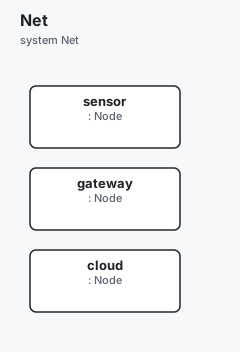
A message going from a sensor to the cloud, through a gateway:
const HOPS: int32 = 4

component Node

system Net {
  part sensor:  Node
  part gateway: Node
  part cloud:   Node
}

animation v-path "From the sensor to the cloud" from flow {
  stops [Net.sensor, Net.gateway, Net.cloud]   // each stop shows the part's name
  speed HOPS * 55                              // a formula: worked out on the slide
  height 160
  group "Stories"
  duration 4s
}
from flow names the template. stops and speed are the data the template
reads. height, group and duration are the visual's own properties.
Preview it in a browser, without Arche:
archec animation preview main.arche v-path -o path.html --open✓ v-path → path.htmlOr build the Arche project:
archec build main.arche -o proj✓ 10 files → proj (net.yaml, models.yaml, templates.yaml, variables.yaml, simulation.yaml, menu.yaml, visuals/v-path.html, visuals/v-path.yaml, visuals.yaml, layout.yaml)archec build writes the same files as Arche's own animation editor, so the
app opens the animation as one of its own:
| File | What it holds |
|---|---|
visuals/v-path.html |
The drawing: the template's code, unchanged. |
visuals/v-path.yaml |
The content it draws. The drawing reads it as arche.data. |
visuals.yaml |
Its entry: name, height, group, duration, the parameters it is sent. |
visuals/v-path.yaml holds the parts' names and the formula:
stops:
  - label: sensor
    x: 80
  - label: gateway
    x: 320
  - label: cloud
    x: 560
speed: ${HOPS * 55}Templates#
The templates are Arche's own: 72 of them, in 14 categories. The categories are: basics, flows (a message along a path, pipelines, sequences, a producer and a consumer around a buffer, retries), timing (timelines, waveforms, latency budgets, schedules), state machines (a walk, a life cycle, checks passing and failing, fail-over), signals, data, interfaces, FPGA, hardware, geometry, mission, naval, antenna and comms.
archec animation list               # the gallery, by category
archec animation list Timing        # one category
archec animation show flow          # what it draws, the data it reads, a starter block
archec animation new sequence v-boot --into app/visuals.arche
archec animation show flow prints:
flow — Message along a path (Flow)
A dot travelling between boxes — "who sends what to whom", in one line.

Data it reads
  stops  a list of { label, x } — The boxes the message crosses, left to right.
  speed  a number — px per second (sample: 220)

Starter
animation v-flow "Message along a path" from flow {
  // The boxes the message crosses, left to right.
  stops [{ label: Terminal, x: 80 }, { label: PS, x: 320 }, { label: PL, x: 560 }]
  // px per second
  speed 220
}showlists each piece of data the template reads, its shape, and what the template's own sample says of it.newwrites a starter block. Its data is the template's sample, written in the language. It builds as it is, and draws what the template's gallery picture draws, until you change it.
The template is named in the header (from flow) or as a property
(template flow). archec bundles Arche's template library
(vendor/animations.js). A template added to the app is checked here as soon
as archec is rebuilt beside it.
The content, and the model#
The visual's own properties are height, group, comment, duration,
fps, params, tags, variants and data-file. (data-file is where the
content is written, when it is not visuals/<id>.yaml.) Every other property
is content for the template. It is written the way the language writes values:
| Written | Written for the drawing |
|---|---|
step 1.4, ok true, title "Gain per channel" |
as written |
stages Parse, Compute, Write |
a list (as [Parse, Compute, Write]) |
{ label: PS, x: 320 } |
a record |
Net.gateway: a component, a system, a requirement… |
its name, as the app shows it |
HOPS: a constant or a parameter |
${HOPS}: the app reads the project on the slide |
HOPS * 8 |
${HOPS * 8}, worked out the same way |
| a bare word that names nothing | the word |
So a slide follows the design. Rename the part, and the stop shows the new
name. Change HOPS, and the dot goes faster. A dotted path that names nothing
is a warning: it is more likely a typo than a caption.
A list of names where the template wants records. flow reads
stops: [{ label, x }], but stops [Net.sensor, Net.gateway, Net.cloud] is
enough.
- Each name becomes the record's
label. - The other fields come from the template's sample.
- A position that the sample spreads (80, 320, 560) is spread the same way, over however many items there are.
- Any other number is taken from the sample item at the same place.
A state machine. machine <part> fills what a state-machine template
reads:
states. In thestatestemplate, they are in the order they are reached. Inlifecycle, each state is placed in a column by how many transitions it is from the initial one.edges: the transitions and their triggers. An edge is bent when two states go both ways.walk: every transition, each taken once where it can be.
animation v-life "Life cycle" from lifecycle { machine Home.door; step 1.5 }A scenario. scenario <id> (or scenario <id>.<sequence>) fills the
sequence template. The participants become the lifelines (actors). Its
steps become the arrows (messages), each labelled with its message.
animation v-boot "Boot" from sequence { scenario boot }What is written in the animation wins over what the model gives.
A drawing of its own#
code "visuals/beam.html" is an animation drawn by your own HTML. The path is
relative to the file it is written in.
- It runs in the same sandboxed frame as a template, and is fed the same way.
- It is copied into the project beside the others.
paramslists the parameters it is sent, asarche.params. A drawing that reads a parameter it is not sent (arche.params.ELEMENTS) is a warning, because the value would arrive undefined.- With a
templatetoo, the template says what data the code reads.
What is checked#
| Code | |
|---|---|
animation-template |
the template does not exist (with the nearest one), or there is neither a template nor code |
animation-data |
data the template does not read; a value of the wrong shape (a word where a number is wanted, a field a record does not have); a path that names nothing; a formula over names that are not constants or parameters |
animation-binding |
machine or scenario names nothing, or the template draws nothing from it |
animation-param |
params names something that is not a constant or parameter; the drawing reads one it is not sent |
animation-visual |
a story step animates something that is not a visual or an animation |
animation-code |
the code file does not exist |
In a story#
story tour "The tour" {
  step s1 "The door" { text "The door opens and closes."; animate v-life; dwell 8s }
}animategives the step'svisuals. They are checked against the project's visuals and animations.dwellis how long the step stays when the story plays by itself.
Seeing one without Arche#
archec animation preview main.arche v-boot --open   # a page that plays it
archec animation render main.arche v-boot -o boot.gif
archec story export main.arche tour --lang en -o tour.html
preview writes a page that plays the animation in a sandboxed frame, exactly as a slide does. Its
${…}are worked out against the constants and parameters. The page works in light or dark. Without an id, it previews every animation.render records a GIF, the way Arche's .pptx export records one: the drawing paints its own frames. It needs headless Chrome or Chromium (
--chrome, or$CHROME). It records one cycle of theduration(3 s without one), at itsfps(10 without one).story export writes the whole story as one file, for someone who has no Arche. It holds:
- the steps, in the language asked;
- the animations, running;
- the pictures, and the block diagram of a step that is on a system;
- the notes (press
n).
Press
p(or add#playto the address) to play it by itself, each step for itsdwell. Nothing is fetched from the network.
In VS Code#
- The Animations view lists the project's animations (click one to preview it) and the templates by category (click one to insert a starter block at the cursor).
- ▶ Preview above each
animationopens the preview beside the editor. It follows the model: edit the data, and the picture changes. - After
from, completion offers the templates. - At the start of a line in an animation, completion offers the data its template reads and has not been given yet, each with its sample as the value.
- Hover says what a piece of data is for.
Limits#
- The templates are Arche's. archec knows only the ones bundled when it was built: a template added to the app needs archec to be rebuilt beside it.
archec animation renderneeds headless Chrome or Chromium.