The arche-lang core
This page is the core of arche-lang: what you need to model a small product, from what it must do to what proves it. Everything here is covered by the stability promise of edition 1.0 (editions.md): a model written with the core keeps building, and a renamed name keeps working for one more edition, with a warning and an automatic fix.
The rest of the language is made of extensions: physics, safety analyses, the product's UI, Capella and ReqIF exchange, containers, and more. The tools read them the same way, but they have no stability promise yet. Each one is marked Extension in the full specification.
archec check --core main.arche lists every construct a model uses outside the
core, with its extension. The tutorials and examples/greenhouse
use only the core; the tests check it. The blocks below, in order, are one
model, a kettle that heats water to a set temperature, and the tests compile it.
A project#
Full spec: source files and declarations
project Kettle "Kettle" {
  description "A kettle that heats water to the temperature asked for."
  version "0.1.0"
  edition "1.0"
  author "The kettle team"
  level simple
}
A model is one or more .arche files. The main one has the project. Its
edition says how the model is read (editions.md). level simple
is this page: the editor offers the core, and says how to use anything else.
A project shares components through libraries. libraries says which folders
hold them, uses which versions it accepts, and include reads a file of one:
project Kettle "Kettle" {
  libraries "../shared"
  uses arche-hw-store "^0.1"
}

include "arche-hw-store/devices/relay/relay.arche"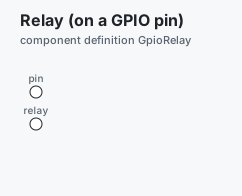
A library is a folder with a library.arche. Its renamed says which of its
declarations changed name, for which edition: a model that writes an old name
still builds, with a warning that archec fix resolves
(editions.md).
library kettle-parts "Kettle parts" {
  description "Heaters and their probes."
  version "1.1.0"
  archec ">=0.13"
  uses arche-types "^0.1"
  author "The kettle team"
  license "MIT"
  edition "1.0"
  renamed "1.0", { Element: HeatingElement }
}
Data, messages and units#
unit mK "millikelvin" { quantity temperature; base K; factor 0.001; symbol "mK" }

type Celsius = float32 unit °C range -20..120

enum Strength { LOW, MEDIUM, HIGH = 4 }

struct Setting "Setting" {
  description "What the user asks for."
  target:   Celsius "Target" { description "The water's temperature to reach." }
  strength: Strength
}

const MAX_TARGET = 100 unit °C { description "Water boils." }

message SET "Set" { description "The user's setting."; setting: Setting }
message WATER "Water temperature" {
  period 200ms
  temperature: Celsius
}
message STOP: bool "Stop"

event boiled_dry "Boiled dry" { description "The probe reads far above 100 °C." }- A
typeis a base type (bool,int8…uint64,float32,float64,string,duration) with aunitand arange. - An
enumlists its literals; astructlists its fields, each a name and a type, with an optionalunit,rangeanddescription. - A
messagecarries one value (message STOP: bool) or fields. Itsperiodsays how often it is sent. Itsunit, on a single value, is that value's. - An
eventis what a state machine reacts to that is not a message. - A quantity is a number and its unit, with no space:
200ms,3.3V,°C. archec checks that what you compare or add has the same quantity. Aunitdeclaration adds one: itsquantity, itsbaseunit andfactor(oroffset), itssymbol, other spellings (alias), orlogarithmicfor dB.
Requirements#
Full spec: requirements and traces
requirement REQ-HEAT "Heat to the target" {
  description "The kettle's main function."
  text "The kettle shall heat the water to the target temperature within 5 min."
  rationale "Users wait for it."
  priority high
  status approved
  method test
}
requirement REQ-DRY "Never heat dry" {
  text "The kettle shall stop heating within 1 s when it boils dry."
  derives REQ-HEAT
  formal "ctl in Dry leads to ctl in Idle within 11s"
}
A requirement says what the system shall do. Whatever meets it says so, with
satisfies; a test case that checks it says verifies. derives names the
requirement it comes from. formal is a property archec verify proves and
archec replay checks on a trace: always …, never …, eventually …,
a leads to b within 2s, a implies b.
Components, ports and interfaces#
interface Heater "Heater" {
  description "Something that heats when told."
  messages STOP
  fn on()
  fn off()
}
interface SafeHeater "Heater with a cut-out" extends Heater

component Probe "Temperature probe" {
  description "An NTC probe on an ADC pin."
  kind sensor
  out water: data sends WATER { noise 0.2°C; resolution 0.1°C }
  in adc:    analog "ADC" { description "The probe's pin."; pins { io PA0 } }
  fn read "Read" {
    wcet 100us
    ```arche
    send water WATER { temperature: 20.0 }
    ```
  }
}

component Element "Heating element" {
  kind device
  in heat:   provides SafeHeater "Heat"
  inout i2c: i2c "Driver" { address 0x40 }
  fn on()
  fn off()
}
A component has ports. A port has a direction (in, out, inout), a port
type (can, i2c, gpio, data, analog… are built in), and what crosses it:
the messages it sends or receives, or an interface it provides or
requires. Through a port that requires an interface, a body calls the
operations of the part at the other end (heater.on()). pins and address
say where a port is wired; noise and resolution, how a sensor reads in the
simulator. depth is how many messages wait at an in port.
Behaviour: functions, variables and state machines#
component Controller "Kettle controller" {
  description "Heats until the target, stops on demand or when dry."
  satisfies REQ-HEAT
  in water: data receives WATER { depth 4; handler WATER -> seen }
  in user:  data receives SET, STOP {
    on-receive ```arche
      log "a command"
    ```
  }
  out heater: requires Heater { satisfies REQ-DRY }
  var target: float32 = 0 unit °C range 0..100 { description "What to reach." }

  fn seen(temperature: float32) ```arche
    log "water at", temperature
  ```
  fn above(t: float32) -> bool "Above the target" {
    description "Whether a reading is past the target."
    satisfies REQ-HEAT
    wcet 50us
    ```arche
    return t >= target
    ```
  }

  states {
    initial Idle
    state Idle "Off" {
      description "Waiting for a setting."
      on-enter ```arche
        heater.off()
      ```
    }
    state Heating "Heating" {
      on-enter ```arche
        heater.on()
      ```
      on-exit ```arche
        heater.off()
      ```
    }
    state Dry "Boiled dry"
    Idle -> Heating on SET [setting.target <= MAX_TARGET] / log("heating")
    Heating -> Idle on WATER [above(temperature)]
    Heating -> Idle on STOP
    Dry -> Idle on "after 10s"
    * -> Dry on boiled_dry
  }
}- A
fnhas parameters and a result, abodyin the action language (a```archeblock), and itswcet: the longest it may take. handler WATER -> seencallsseenwhen a WATER arrives, its fields by name.- A
varhas a type, a value to start with, aunitand arange. statesholds the machine. It starts in its first state, or in the oneinitialnames. A state'son-enterandon-exitare bodies.- A transition is
From -> To on trigger [guard] / action. The trigger is a message (its fields are names in the guard:setting,temperature), an event, or"after 10s".* -> Dryleaves every state.
The action language#
A body is a list of statements, one per line:
| Statement | Example |
|---|---|
| a local | var d = t - target, var buf: int32[8] |
| an assignment | x = e, x += 1 (also -=, *=, /=) |
| a choice | if a { … } else if b { … } else { … } |
| a loop | while c { … }, for i in 0..8 { … }, for x in buf { … }, break, continue |
| a message | send port MSG { field: e }, send port true for a single value |
| a state | goto Heating, and state == Heating in a condition |
| time | wait 10ms (in a function that runs on its own: fn main) |
| a result | return e |
| a trace | log "text", e |
| a call | f(x) (the part's own function), port.op(x) (the part at the other end) |
Expressions: or and not, == != < <= > >=, + - * / %, the bit operators on
integers, x.f, a[i], if c { a } else { b }, records ({ f: e }),
durations (10ms), and the builtins now() abs min max sqrt sin cos atan2 clamp int float to_s to_ms len. archec checks the names, the types and what
each port carries, then writes the body as Python for the simulator, and as C,
Rust or Go for the firmware.
A system and its links#
component Mcu "Kettle MCU" { kind processor; cores 1; hal stm32; chip "stm32f446re"; inout uart: uart "UART" }

component Bus "Serial line" { kind bus; bitrate 115200 }

system KettleSys "Kettle" {
  description "The kettle and its controller."
  satisfies REQ-HEAT
  part mcu:     Mcu
  part line:    Bus
  part probe:   Probe
  part element: Element
  part ctl:     Controller
  probe.water -> ctl.water
  ctl.heater -> element.heat { description "Mains, through a relay." }
  mcu.uart -> line
}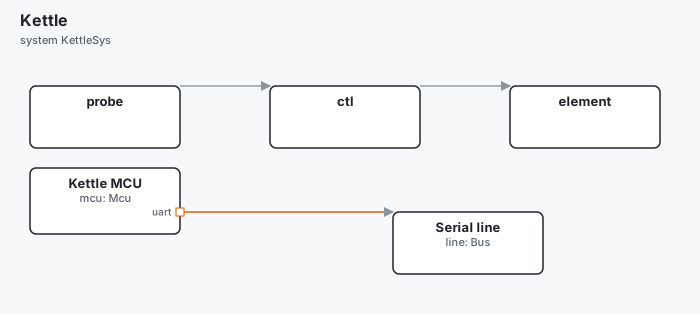
A system holds parts, each an instance of a component, and links between
their ports (a.p -> b.q). archec checks that one end receives what the other
sends, and that a required interface is provided. A component's kind is one
archec knows: processor (with its cores, its hal and its chip), bus
(with a bitrate), board, device, sensor, actuator, power, plant,
environment. A kind of your own is declared in a catalog (an extension).
Tests#
test-plan TP-KETTLE "Kettle" {
  description "Heating and stopping."
  verifies REQ-HEAT
  case TC-HEAT "Heats, then stops at the target" {
    description "From cold to 90 °C."
    verifies REQ-HEAT
    timeout 5s
    at 0ms do send probe.water WATER { temperature: 20.0 }
    at 10ms do send probe.water WATER { temperature: 95.0 }
    within 100ms expect ctl.state == Idle
  }
}
A case is a timeline: at a time, do something (set a value, send a
message); at or within a delay, expect a condition. These lines are the
action language, checked as a body is, with the system's parts for names: an
assignment (ctl.target = 90.0), a send from a part's port, and conditions
on states (ctl.state == Idle), variables and sent(WATER). A line the action
language cannot read is Python, as before: the codegen extension, and
archec fix writes the common ones over. archec test runs the plans in the
simulator and says which requirements they verify.
Where it runs#
deployment OnBoard "On the MCU" {
  description "One firmware with two threads."
  system KettleSys
  platform KettleSys
  binary firmware "kettle.elf" on mcu {
    description "The firmware."
    thread control "Control" { description "The controller."; runs ctl; priority 2; queue 4; wcet 1ms }
    thread sense "Sense" { runs probe; period 200ms; step read; priority 1 }
  }
  chain reaction "From a reading to the heater" { description "REQ-DRY's second."; through probe, ctl; budget 1s; satisfies REQ-DRY }
}
A deployment places the parts of a system on the processors of a
platform (a system too; here, the same one). A binary runs on a
processor; each thread runs parts, every period (calling its step
function) or when a message comes, at a priority, with a queue for what
waits. A chain gives a budget to the path through some parts:
archec analyze adds up the worst case, and archec timing measures it on a
trace.
What is not in the core#
Every extension, as archec check --core names it; the full spec marks each.
| Extension | What it covers |
|---|---|
deployment |
processes, containers, interrupts, routes, allocators, watchdogs, packaging |
hardware |
a board's resources, products and drivers, registers, power pins |
communication |
delivery patterns, pub-sub, services and HTTP routes, dataflow, link timing |
machines |
pseudo-states, regions, activities, deadlines |
physics |
equations, Modelica and FMUs, bodies and joints, actuator response |
safety |
hazards, failure modes, fault trees, STPA, TARA, ASIL and DAL |
functional |
actors, missions, use cases, system functions, operating modes |
scenarios |
sequences, simulations, stimuli, keyframes, fault injection |
design |
decisions, variants, parameters, studies, viewpoints, rules, budgets |
cad |
a part's geometry as code, its material, measured limits, clearances |
fpga |
a component with a clock: signals, registers, bit widths, VHDL and GHDL |
testing |
case tables, setup code, the old step blocks |
requirements |
EARS, metrics and limits, categories, IVV blocks, more trace kinds |
exchange |
Capella, SysML, ReqIF and Polarion sources, issue trackers |
components |
a part's life, IDL operations, contracts, struct inheritance |
codegen |
native types, wire formats, Python and TypeScript bodies, code files |
catalogs |
kinds, layers, tags, colours, port types, packages, defaults, translations |
ui |
the product's screens, layouts and elements |
app |
the Arche app: pages, panels, stories, animations, the canvas |
generators |
generators, importers, exporters, plugins |
store |
a library's Arche Store data, the trust a project gives |
ai |
what may leave the machine |
The commands work the same on both. Those the loop needs (check, fmt, fix, test, gen, analyze,
verify, timing, replay, status, why) are part of the 1.0 promise: what they accept and their verdicts, not
the layout of their output, their messages or the code they generate. The others are the extensions' tools (commands).
Editions and the promise#
- A project names its
edition. Edition 1.0 reads a model exactly as 0.13 does. - What this page describes keeps its meaning in every 1.x edition.
- A name that changes (a keyword, a property, a library's declaration) is read
for one more edition, with a warning and an automatic fix (
archec fix, and the quick fix in the editor). Then it is an error: the store'sLed→GpioLedis made for 1.0, a warning through 1.0 and an error from 1.1. - Extensions may still change, the same way: through an edition, with a fix.